
Contents:
1. Trial
We may offer a trial subscription for the service. Unless you cancel before the end of the trial, you will be automatically charged a price indicated on the payment screen or/and Apple’s/Google’s payment pop-up screen for a chosen subscription period. Please note that if a trial is offered, this will be explicitly stated on the price screen before the checkout. If this is not the case, you will purchase our subscription without a trial. We may also from time to time offer discounted offers that renew at the full not discounted price and other offers that may be interesting for you.
2. Subscription
The subscription renews automatically at the end of each period (each week, 4 weeks, 12 weeks, a year, or otherwise, depending on the option selected by you at the time of purchase) until you cancel. We may also offer you additional plans, features, or upgrades related to your subscription.
3. Payment method
By completing your purchase (including by single-touch confirmation, fingerprint or facial recognition, by entering your payment details on the web, or by otherwise accepting these Terms presented on the payment or pop-up screen provided by Apple, Google, or on our website), you authorize us to charge your selected payment method the price for your first subscription period (the introductory or trial price if one is offered or otherwise the full price), and to charge the recurring subscription fees automatically at the then-current price at the start of each following period until you cancel. The price for your first period and the renewal price are both shown to you before you complete your purchase.
4. Cancellation
Your subscription renews automatically at the end of each period until you cancel. Note that deleting the app does not cancel your subscriptions.
Canceling your subscription means that the automatic renewal will be disabled, but you will still have access to all your subscription features for the remaining time of your then-current period.
If you have subscriptions to more than one plan, each is separate, and canceling one plan does not cancel the others. You must cancel each subscription separately.
If you purchased a subscription or enabled trial on our websites:
To avoid being charged, cancel your subscription before the end of the then-current period. Below you may find several options (that may change from time to time) on how to initiate cancellation of a subscription purchased on our website:
- If you have an iOS device:
Open the BetterMe app, choose the More tab → go to My Profile → choose Manage Subscription (with a redirect to our website).
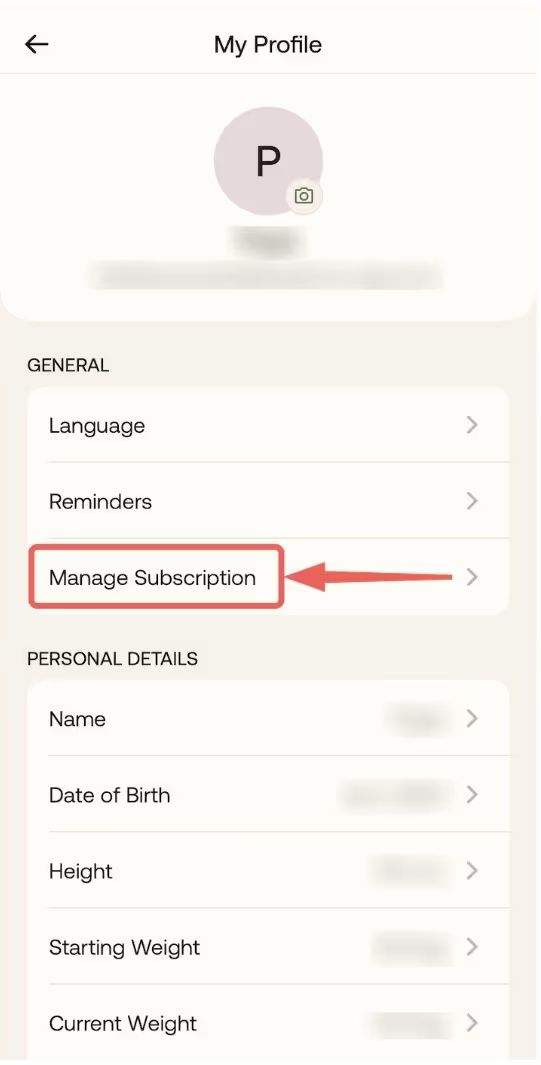
From here, you will be directed to subscription settings and will be able to turn it off.
- If you have an Android device:
Open the BetterMe app, choose the More tab→ go to My Profile → choose Manage Subscription (with a redirect to our website).
From here, you will be directed to subscription settings and will be able to turn it off.
- Don’t have the app? Log in to the BetterMe website and select Manage Subscription.
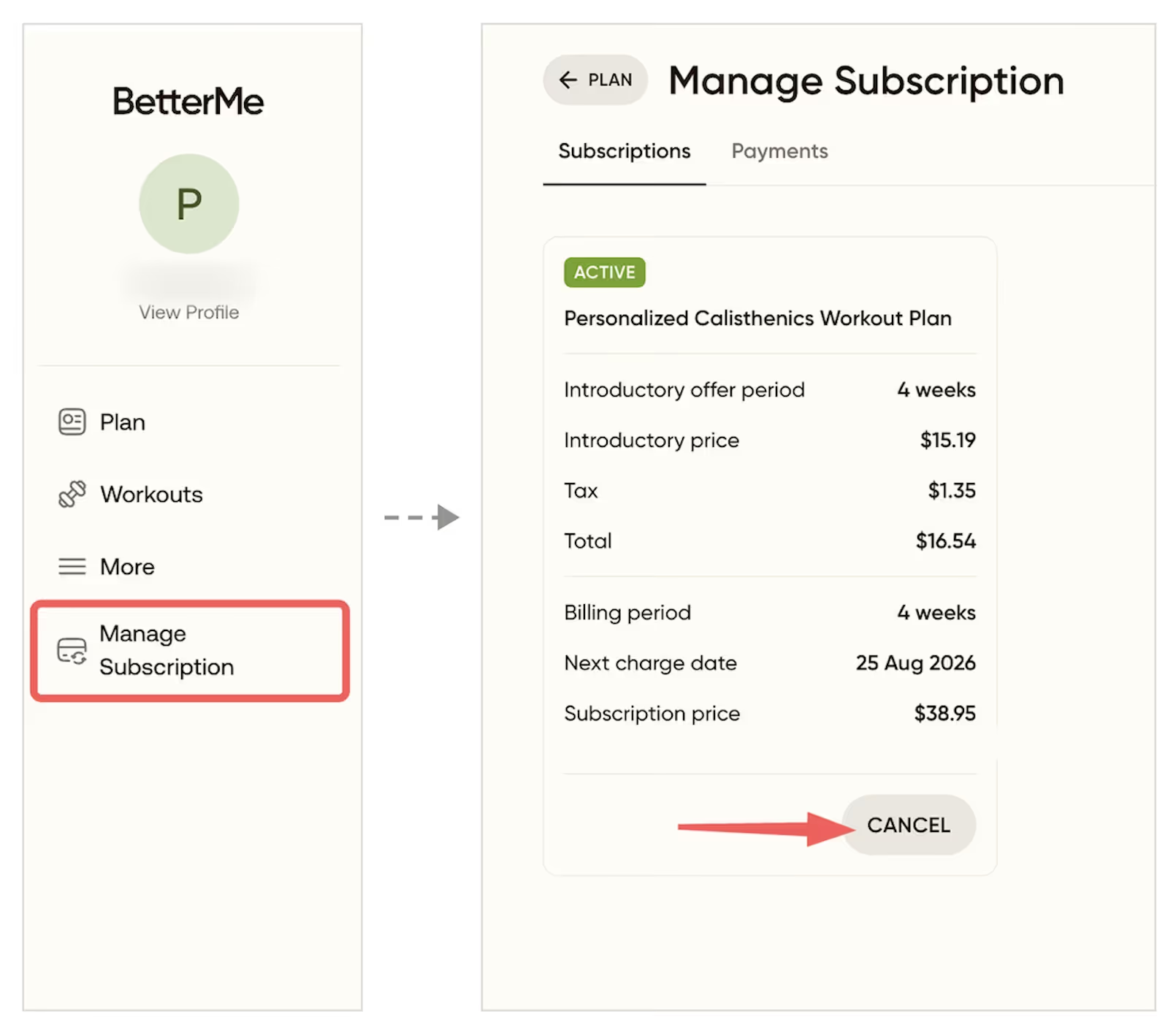
From here, you will be directed to subscription settings and will be able to turn it off.
The prices provided in the examples within these Terms are for informational purposes only and may not reflect the actual pricing of the plan you have purchased. The final price applicable to your purchase will be determined based on the specific plan, features, and any applicable promotions at the time of your transaction.
If you purchased a subscription or enabled trial on the App Store:
You may cancel a trial or a subscription by turning off auto-renewal through your Apple ID account settings. To avoid being charged, cancel the subscription in your Apple ID account settings at least 24 hours before the end of the free trial or the current subscription period. You alone can manage your subscriptions. Learn more about managing subscriptions (and how to cancel them) on Apple support page.
If you purchased a subscription or enabled trial on Google Play:
You may cancel a trial or a subscription by turning off auto-renewal through your Google Play account settings. To avoid being charged, cancel the subscription in your account settings at least 24 hours before the end of the trial or the current subscription period. You alone can manage your subscriptions. Learn more about managing subscriptions (and how to cancel them) on Google’s support page.
If you purchased a subscription or enabled trial on Huawei AppGallery:
You may cancel a trial or a subscription by turning off auto-renewal through your Huawei account settings. To avoid being charged, cancel the subscription in your account settings at least 24 hours before the end of the trial or the current subscription period. You alone can manage your subscriptions. Learn more about managing subscriptions (and how to cancel them) on Huawei’s support page.
5. Refunds
If you purchased a subscription or enabled trial on our websites: We provide refunds at our own discretion and subject to laws and our policies that may be published from time to time. Refunds will be provided if we find the request acceptable.
Please note that subscription fees for a period that has already started or ended are generally non-refundable to the extent the service has been made available to you for that period, unless otherwise provided in our Money-back policy or required by applicable law.
If you purchased a subscription or enabled trial on App Store: If you are eligible for a refund, you'll have to request it directly from Apple. To request a refund, follow these instructions from the Apple support page.
If you purchased a subscription or enabled trial on Google Play: If you are eligible for a refund, you'll have to request it directly from Google. To request a refund, follow these instructions from the Google’s support page.
If you purchased a subscription or enabled trial on Huawei AppGallery: If you are eligible for a refund, you’ll have to request it directly from Huawei. For instructions on how to request a refund, contact Huawei’s customer support.
6. Changes
To the maximum extent permitted by applicable laws, we may change subscription fees from time to time. We will give you reasonable notice of any such pricing changes as required by applicable law, or otherwise by posting the new prices on or through the app and/or by sending you an email notification, or in other prominent ways. If you do not wish to pay the new fees, you can cancel the applicable subscription prior to the change going into effect.
If you have any questions in relation to the subscription terms, please contact us via the chat functionality or directly at support@betterme.world.
Any translation from the English version is provided for your convenience only. In the event of any difference in meaning, version, or interpretation between the English language version of this Subscription Terms available at https://betterme.world/subscription-terms, and any translation, the English language version will prevail.
Please make a screenshot of this information for your reference. This may help you to control your subscriptions.
Last update: 29 July 2026